>apis>partner
Partner API
In today's competitive retail landscape, providing a seamless and personalized consumer journey is paramount. Recognizing this, we are pleased to introduce our Partner API, designed specifically for retailers looking to integrate advanced decisioning capabilities into their own systems. This powerful API allows retailers to independently determine the eligibility of their customers, enhancing the overall consumer experience and driving higher satisfaction and conversion rates.
If you would like to use the Partner API, please get in touch with us here.
Concepts
Introduction
What the Partner API does, how authentication works and how to get started.
Overview
Key Features and Benefits
Authentication
partnerId (a number) and partnerRetailerId (a string).Getting Started
Sign Up
Partner Logo

Documentation and SDKs
Integration and Testing
Go Live
Reference
Environments
Base URLs for the sandbox and production environments.
🧪 Sandbox Environment
https://partner-sandbox.snapfinance.co.uk⚠️ Production Environment
https://partner.snapfinance.co.ukReference
API Endpoints
Every endpoint with its parameters and responses. Try any request from this page.
Each endpoint serves a specific purpose and requires different parameters to be passed in the request. Once you have obtained the token, it will be automatically prepopulated on the headers of every new test request.
Get a token
Attempts to get a token which can be used in the other APIs. The request body must include the clientId and clientSecret for the retailer. This endpoint is used when a broker/retailer needs to get a token. The response includes the newly created bearer token from Auth0.
The token will be valid for 24 hours so please cache it so that you don't call for a token more than once a day.
Body parameters
clientId: stringRequired
clientSecret: stringRequired
POST/v1/token
Response example
Create a Snap application and get a decision
Sends data to Snap for a customer to get finance offers. This endpoint is used to create an application in Snap, the payload includes the customer's name, address, and other relevant information to get a decision.
Header parameters
Authorization: stringRequired
Body parameters
partnerId: integerRequired
partnerRetailerId: stringRequired
partnerAppId: integerRequired
invoiceId: stringRequired
applicationType: string (enum)Required
applicationSource: string (enum)Optional
title: string (enum)Required
firstName: stringRequired
lastName: stringRequired
birthdate: stringRequired
email: stringRequired
mobilePhone: stringRequired
homePhone: stringOptional
maritalStatus: string (enum)Required
marketingPreference: objectOptional
currentAddress: objectRequired
previousAddress: objectOptional
employmentStatus: string (enum)Required
employmentIndustry: integer (enum)Optional
employerName: stringOptional
jobTitle: stringOptional
yearsWithEmployer: integer (enum)Optional
netMonthlyIncome: numberOptional
grossMonthlyIncome: numberOptional
incomeFrequency: string (enum)Required
benefitsType: objectOptional
numberOfDependants: integer (enum)Optional
monthlyExpenditureTotal: numberOptional
monthlyExpenditureBreakdown: objectOptional
creditCommitments: numberOptional
monthlyRentMortgage: numberOptional
rentReason: string (enum)Optional
bankDetails: objectRequired
loanDetails: objectRequired
deliveryDate: stringRequired
submissionDate: stringRequired
basket: array of objectsRequired
clientIp: stringRequired
clientAgent: stringRequired
successUrl: stringRequired
declineUrl: stringRequired
cancelUrl: stringRequired
webhookUrl: stringOptional
redirectUrl: booleanRequired
POST/v1/partner/applications
Response example
Cancel Request
Attempts to cancel Application. The request body must include the partnerId, partnerAppId, partnerRetailerId, and reason for cancel. This endpoint is used when a broker/retailer needs to cancel application. The response includes the message from Snap App.
Header parameters
Authorization: stringRequired
Body parameters
applicationId: numberOptional
partnerId: numberRequired
partnerAppId: numberRequired
partnerRetailerId: stringRequired
reason: stringRequired
POST/v1/partner/cancel
Response example
Change the delivery date of an application's order
This endpoint is used when you would like to change the delivery date of an application's order
Header parameters
Authorization: stringRequired
Body parameters
partnerId: numberRequired
partnerRetailerId: stringRequired
partnerAppId: numberRequired
deliveryDate: stringRequired
PUT/v1/partner/delivery-date
Response example
Fulfillment Request
Attempts to notify about application has been delivered. The request body must include the partnerId, partnerAppId, partnerRetailerId. This endpoint is used when a broker/retailer needs to notify about application delivery. The response includes the message from Snap App.
Header parameters
Authorization: stringRequired
Body parameters
partnerId: numberRequired
partnerAppId: numberRequired
partnerRetailerId: stringRequired
POST/v1/partner/fulfillment
Response example
Refund Request
Attempts to refund an application. The request body must include the partnerId, partnerAppId, and partnerRetailerId. This endpoint is used when a broker/retailer needs to request a refund for an application. The response includes the message from Snap App.
Header parameters
Authorization: stringRequired
Body parameters
partnerId: numberRequired
partnerAppId: numberRequired
partnerRetailerId: stringRequired
amount: numberRequired
reason: string (enum)Required
POST/v1/partner/refund
Response example
Amend a Snap application
Sends data to Snap to create an amendment for an application, the payload includes the loan details, the new invoice, and other relevant information to get a decision.
Header parameters
Authorization: stringRequired
Body parameters
partnerId: integerRequired
partnerRetailerId: stringRequired
partnerAppId: integerRequired
invoiceId: stringRequired
loanDetails: objectRequired
basket: array of objectsRequired
POST/v1/partner/amendment
Response example
Get the status of the application
This endpoint is used when you would like get the status of application
Header parameters
Authorization: stringRequired
Body parameters
partnerId: numberRequired
partnerRetailerId: stringRequired
partnerAppId: numberRequired
POST/v1/partner/status
Response example
Reference
Webhooks
Get a message on your server whenever an application changes status.
How it works
POST request with a JSON body to the webhookUrl you passed when you created that application. You don’t need to poll for updates.webhookUrl. Applications created without one don’t send any.1. Set up your endpoint
POST requests with a JSON body. Send it as webhookUrl in the body of the create application request (/v1/partner/applications).2. Verify and read
status to see what changed and data for the details.3. Reply with 2xx
2xx response quickly. Do any slow work after you reply.Receiving webhooks
webhookUrl you included for that application.| Header | Use |
|---|---|
Content-Type | Always application/json. |
snap-timestamp | The timestamp used to sign the message. It is part of the signing string. |
snap-signature | The signature of the message, as a hex string. Use it to confirm the message came from Snap Finance. |
Verify the signature
snap-timestamp header and the raw request body.1700000000:{"applicationId":…}.snap-signature header. If they don’t match, reject the message.// Node.js
import crypto from 'node:crypto';
// rawBody is the unmodified request body as a string
function isValidSignature(secret, headers, rawBody) {
const timestamp = headers['snap-timestamp'];
const received = headers['snap-signature'];
if (!timestamp || !received) return false;
const expected = crypto
.createHmac('sha256', secret)
.update(`${timestamp}:${rawBody}`)
.digest('hex');
const a = Buffer.from(received);
const b = Buffer.from(expected);
return a.length === b.length && crypto.timingSafeEqual(a, b);
}Handling messages well
2xx response as soon as you have stored the message. Anything else may be treated as a failed delivery.applicationId, status and timestamp to spot a message you have already processed.timestamp for a status as the current information.status. It tells you what the message is about. previousStatusText tells you where the application was before.timestamp to find the latest.Statuses
status field is one of these values.| Status | What it means |
|---|---|
APPROVED | The customer has been approved. |
APPROVED_WITH_CONDITIONS | The customer has been approved, subject to the checks listed in verificationRequired. |
DENIED | The application has been declined. |
PENDING_DOCS | Snap Finance is waiting for documents from the customer. |
PENDING_DEL | The agreement is in place and is waiting for delivery. |
COMPLETE | Delivery has been confirmed and the application is complete. |
WITHDRAWN | The application has been withdrawn. |
FUNDED | The agreement has been funded. |
ERROR | An error has occurred on the application. |
Payloads by status
{
  "applicationId": 1234567,
  "snapAppId": "2608040647UK",
  "status": "APPROVED",
  "previousStatus": 2,
  "previousStatusText": "PENDING",
  "timestamp": "2026-10-27T16:08:29+00:00",
  "continueLink": "https://express.snapfinance.co.uk/?mid=4607&source=SDK&applicationId=1234567",
  "data": {
    "invoiceNumber": "INV-100245",
    "approvedAt": "2026-10-27T16:08:27+00:00",
    "expiryDate": "2026-11-26T16:08:27+00:00",
    "maxAmount": 1500,
    "maxTerm": 24,
    "offers": [
      {
        "termMonths": 12,
        "apr": 29.9,
        "interestRate": 0.162,
        "approvedAmount": 1500,
        "loanAmount": 1000,
        "repaymentAmount": 96.84,
        "paymentFrequency": "MONTHLY",
        "totalRepayable": 1162.08,
        "totalInterestRepayable": 162.08,
        "deposit": 0,
        "totalCashPrice": 1000
      },
      {
        "termMonths": 24,
        "apr": 29.9,
        "interestRate": 0.319,
        "approvedAmount": 1500,
        "loanAmount": 1000,
        "repaymentAmount": 54.97,
        "paymentFrequency": "MONTHLY",
        "totalRepayable": 1319.28,
        "totalInterestRepayable": 319.28,
        "deposit": 0,
        "totalCashPrice": 1000
      }
    ]
  }
}
Top-level fields
2026-10-27T16:08:29+00:00. Amounts are in pounds.| Field | Type | Description | Sent on |
|---|---|---|---|
applicationId | number | Snap Finance’s numeric ID for the application. | All |
snapAppId | string | The application reference, for example 2608040647UK. | All |
status | string | The new status. One of APPROVED, APPROVED_WITH_CONDITIONS, DENIED, PENDING_DOCS, PENDING_DEL, COMPLETE, WITHDRAWN, FUNDED, ERROR. | All |
previousStatus | number | The code of the last status before this change. Use previousStatusText to read it. | All |
previousStatusText | string | The last status before this change, for example PENDING or PENDING_DOCS. | All |
timestamp | string (date-time) | When the change happened, with a UTC offset, for example 2026-10-27T16:08:29+00:00. | All |
continueLink | string | A link to Snap Finance’s application page for the customer. | APPROVED, APPROVED_WITH_CONDITIONS, PENDING_DOCS |
data | object | The status-specific fields below. | All |
Fields in data
| Field | Type | Description | Has a value on |
|---|---|---|---|
invoiceNumber | string | The invoice number for the application. | All |
approvedAt | string (date-time) | When the application was approved. | APPROVED, APPROVED_WITH_CONDITIONS |
expiryDate | string (date-time) | When the approval expires. | APPROVED |
maxAmount | number | The maximum amount the customer is approved for, in pounds. | APPROVED, PENDING_DEL |
maxTerm | number | The maximum term in months. | APPROVED |
offers | array of offers | The offers available to the customer. See Offer fields. | APPROVED |
verificationRequired | array of strings | The checks the customer still needs to complete, for example ["INCOME_PORTAL"]. | APPROVED_WITH_CONDITIONS |
verificationExpiry | string (date-time) | When the verification step expires. | APPROVED_WITH_CONDITIONS |
declinedAt | string (date-time) | When the application was declined. | DENIED |
declineReason | string | The decline reason code, for example ELIGIBLE_CHECK. | DENIED |
documentsExpiry | string (date-time) | When the customer’s documents are due by. | PENDING_DOCS |
fulfilmentExpiry | string (date-time) | The date by which the order needs to be fulfilled. | PENDING_DEL |
approvedAmount … totalCashPrice | as in Offer fields | The agreed figures for the application: approvedAmount, loanAmount, totalCashPrice, deposit, termMonths, repaymentAmount, paymentFrequency, interestRate, apr, totalRepayable and totalInterestRepayable. They use the same types and meanings as the offer fields, but sit directly in data. | PENDING_DEL, COMPLETE |
subsidyPercentage | number | The subsidy percentage, for example 0.08. | PENDING_DEL, COMPLETE |
subsidyFee | number | The subsidy fee in pounds. | PENDING_DEL, COMPLETE |
brokerCommission | number | The broker commission rate, for example 0.02. | PENDING_DEL, COMPLETE |
brokerCommissionAmount | number | The broker commission in pounds. | PENDING_DEL, COMPLETE |
completedAt | string (date-time) | When the application was completed. | COMPLETE |
withdrawnBy | string | Who withdrew the application. | WITHDRAWN |
withdrawnAt | string (date-time) | When the application was withdrawn. | WITHDRAWN |
withdrawReason | string | The reason for the withdrawal, for example Retailer Request. | WITHDRAWN |
fundedAmount | number | The amount funded, in pounds. | FUNDED |
fundingDate | string (date-time) | The date of funding. | FUNDED |
fundingReference | string | The funding reference. | FUNDED |
errorCode | string | The error code. | ERROR |
errorMessage | string | A description of the error. | ERROR |
occurredAt | string (date-time) | When the error occurred. | ERROR |
Offer fields
offers has these fields.| Field | Type | Description |
|---|---|---|
termMonths | number | Term of the agreement in months. |
apr | number | Annual percentage rate, for example 29.9. |
interestRate | number | Interest rate, for example 0.162. |
approvedAmount | number | Approved amount in pounds. |
loanAmount | number | Loan amount in pounds. |
repaymentAmount | number | Amount of each repayment in pounds. |
paymentFrequency | string | How often repayments are made, for example MONTHLY. |
totalRepayable | number | Total amount repayable in pounds. |
totalInterestRepayable | number | Total interest repayable in pounds. |
deposit | number | Deposit in pounds. |
totalCashPrice | number | Total cash price in pounds. |
Tools
Postman Collection
Test every endpoint from Postman instead of the browser.
Download a collection with every endpoint above. It is generated from the same API specification as this page, so it is always up to date.
Step 01 Import the collection
Step 02 Set the collection variables
clientId, clientSecret, partnerId, partnerRetailerId.clientId, clientSecret are only used to get a token, while partnerId, partnerRetailerId stay the same across requests and are filled into the body of every other request in the collection.baseUrl defaults to https://partner-sandbox.snapfinance.co.uk. Change it to https://partner.snapfinance.co.uk to use the Production environment.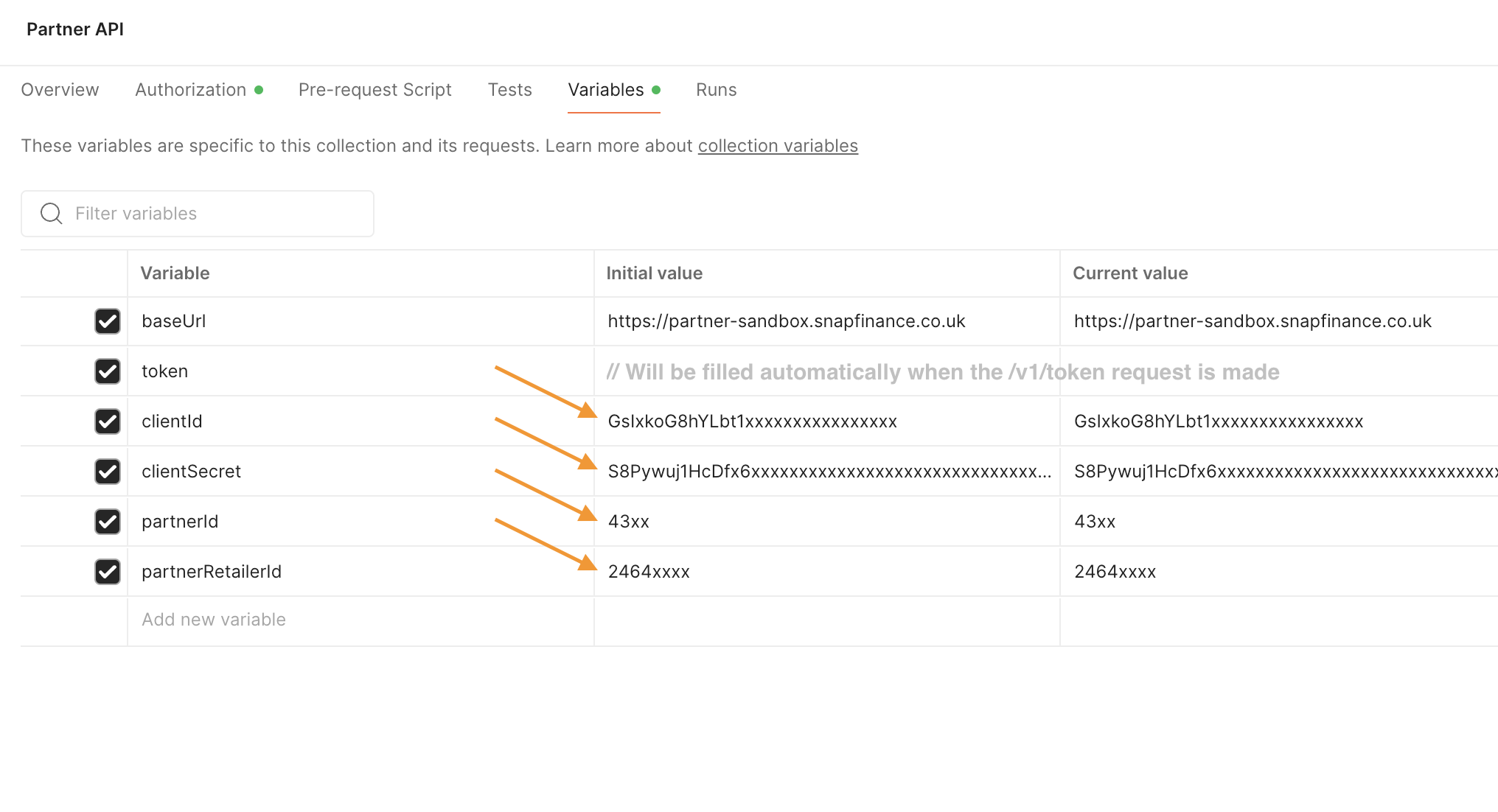
Step 03 Get a token
token automatically and sent with every other request in the collection.