/apis/partner

Partner API

ℹ️ If you would like to use the Partner API, please get in touch with us here.

In today's competitive retail landscape, providing a seamless and personalized consumer journey is paramount. Recognizing this, we are pleased to introduce our Partner API, designed specifically for retailers looking to integrate advanced decisioning capabilities into their own systems. This powerful API allows retailers to independently determine the eligibility of their customers, enhancing the overall consumer experience and driving higher satisfaction and conversion rates.

Introduction

Overview

Our Partner API is a robust and flexible solution that empowers retailers to embed our sophisticated decisioning endpoints directly into their consumer journey. By leveraging this API, retailers can perform real-time eligibility checks on their customers, enabling faster and more accurate decision-making processes. Whether it's for credit approvals, membership qualifications, or special offers, our API ensures that your customers receive timely and relevant responses tailored to their individual profiles.

Key Features and Benefits

Real-time Decisioning: Our API delivers instantaneous responses, allowing retailers to provide immediate feedback to their customers. This speed is critical in maintaining engagement and reducing drop-off rates during key decision points in the consumer journey.
Seamless Integration: Designed with ease of use in mind, our API can be smoothly integrated into your existing systems. Whether you are using a bespoke platform or a widely-adopted e-commerce solution, our comprehensive documentation and support resources make the integration process straightforward and hassle-free.
Enhanced Customer Experience: By incorporating our decisioning endpoints, retailers can offer a more personalized and efficient service. Customers benefit from quick eligibility checks, reducing the friction and uncertainty often associated with these processes.
Data Security and Compliance: We understand the importance of data security and compliance. Our API adheres to the highest standards of data protection, ensuring that all customer information is handled with the utmost care and in accordance with relevant regulations.

Authentication

To use our Partner API, retailers will be given four credentials during the onboarding process: a Client ID, a Client Secret, a Partner ID and a Partner Retailer ID. These credentials ensure that only authorized entities can access the decisioning endpoints, maintaining the integrity and security of the system.
Partner ID and Partner Retailer ID: These identify you as a partner and the retailer you are integrating. They stay the same across every request and must be sent in the body of every request to the endpoints below (apart from the token request), as partnerId (a number) and partnerRetailerId (a string).
Client ID and Client Secret: These are used to request an authorization token. The Client ID also helps track and manage the usage of the API, providing insights into how the decisioning services are being utilized. Keep your Client Secret private.
Authorization Token: This token is a unique identifier that verifies the identity of the requester. It is mandatory for each API call, ensuring that only authenticated and authorized requests are processed. It is obtained via a request using your unique Client ID and Client Secret.

Getting Started

We have designed the onboarding process to be as smooth as possible. Below is a step-by-step guide to getting started with our Partner API:

Sign Up

Contact our sales team to express your interest in using the Partner API. They will guide you through the initial sign-up process and provide you with your credentials: a Client ID, a Client Secret, a Partner ID and a Partner Retailer ID.

Partner Logo

Contact our sales team to have your logo displayed on our SDK. The logo should be submitted in PNG, JPG, or SVG format and have maximum dimensions of 175 pixels in width and 50 pixels in height.
SDK-Image

Documentation and SDKs

Access our comprehensive API documentation and Software Development Kits (SDKs) from our developer portal. These resources include detailed information on API endpoints, request/response formats, and sample code to help you get started quickly.

Integration and Testing

Use the provided documentation to integrate the API into your system. Our support team is available to assist with any technical queries you might have during this phase. We also offer a sandbox environment where you can test your integration before going live.

Go Live

Once you have successfully tested the integration, you can move to the live environment.

Environments

🧪 Sandbox Environment

This environment should be used during the integration phase. The "Try It Out" feature below will execute requests against the sandbox environment. This environment is a safe space to test your integration without affecting real production data. The base URL for the sandbox environment is shown opposite.

⚠️ Production Environment

Once your integration has been tested and is ready for production, you should update your API requests to point to the production environment. All API requests will interact with live data. The base URL for the production environment is shown opposite.

API Endpoints

Below are the available endpoints for the Snap Partner API. Each endpoint serves a specific purpose and requires different parameters to be passed in the request. Please refer to the documentation for detailed information on each endpoint. Once you have obtained the token, it will be automatically prepopulated on the headers of every new test request.

Postman Collection

Prefer to test from Postman? Download a collection with every endpoint above. It is generated from the same API specification as this page, so it is always up to date.

Step 1: Import the collection

Download the collection using the button above. In Postman, select Import and drop in the downloaded file. The collection includes every endpoint listed above, with example request bodies.

Step 2: Set the collection variables

Open the collection, go to the Variables tab and fill in the credentials provided during onboarding: clientId, clientSecret, partnerId, partnerRetailerId.
clientId, clientSecret are only used to get a token, while partnerId, partnerRetailerId stay the same across requests and are filled into the body of every other request in the collection.
baseUrl defaults to https://partner-sandbox.snapfinance.co.uk. Change it to https://partner.snapfinance.co.uk to use the Production environment.
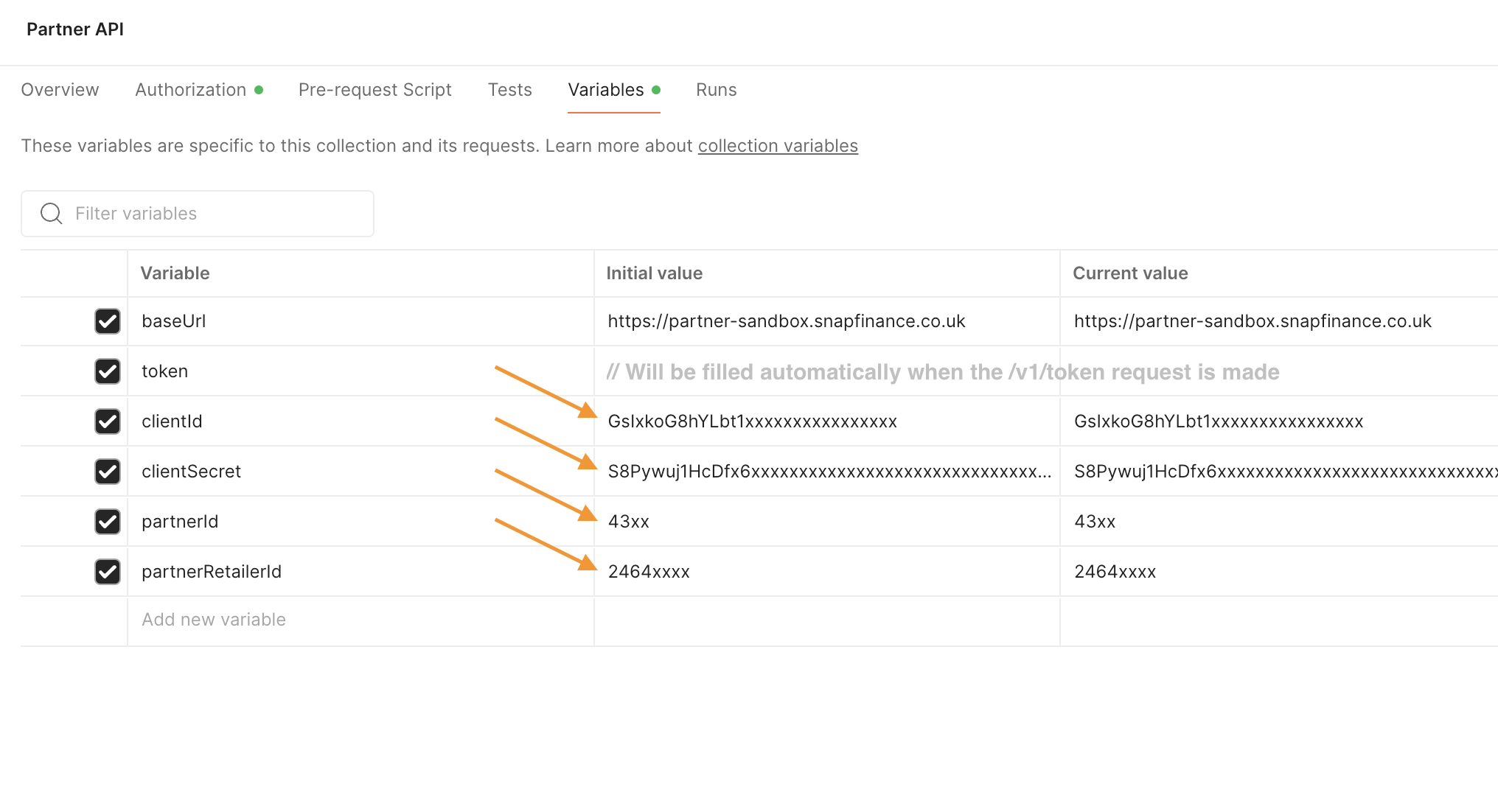
Postman Variables

Step 3: Get a token

Send the Get a token request. The response is saved to token automatically and sent with every other request in the collection.