>webhooks
Webhooks
Get notified the moment an application changes status. Instead of polling for updates, register an endpoint and Snap will send you an event when a customer is approved, signs their agreement, or when you've been paid.
Webhooks are available in both sandbox and production, only for selected retailers. Please get in touch with your account manager if you want to integrate webhooks.
Concepts
Overview
What webhooks are for and how to start using them.
How it works
When an application at your store changes status, Snap sends an HTTPS
POST request to every endpoint you have registered. Your system can then update the order straight away, without polling the Status API.Webhooks are managed from the Webhooks section of the Merchant Portal. From there you can add endpoints, choose which events each one receives, see every delivery and resend any that failed.
Availability
Webhooks are available to all retailers, in both sandbox and production. To start using them, ask your Snap Finance account manager to enable them for your store.
Setup
Get started
From access to your first verified event, in four steps.
Step 01 Get access
Ask your account manager to enable webhooks for your store.
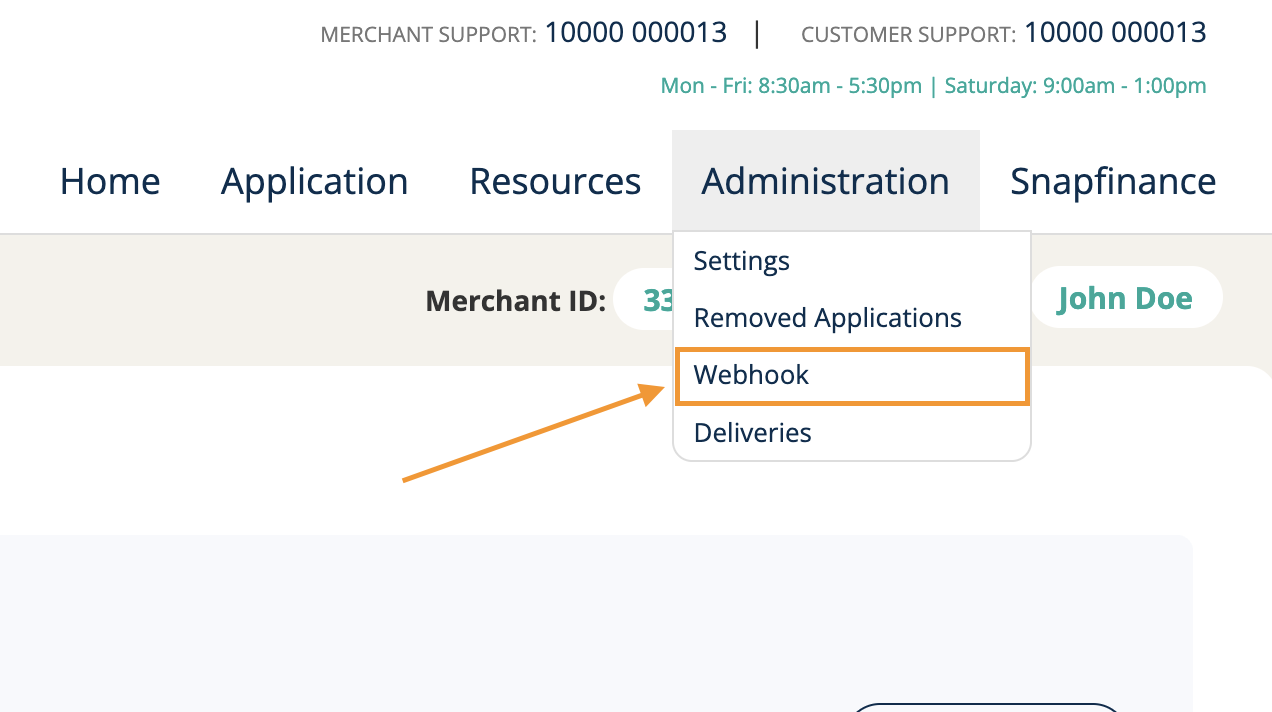
In the Merchant Portal, the user who will manage webhooks needs the Access Webhooks permission. Once it is granted, a Webhook option appears under Administration in the portal menu.
Step 02 Add an endpoint
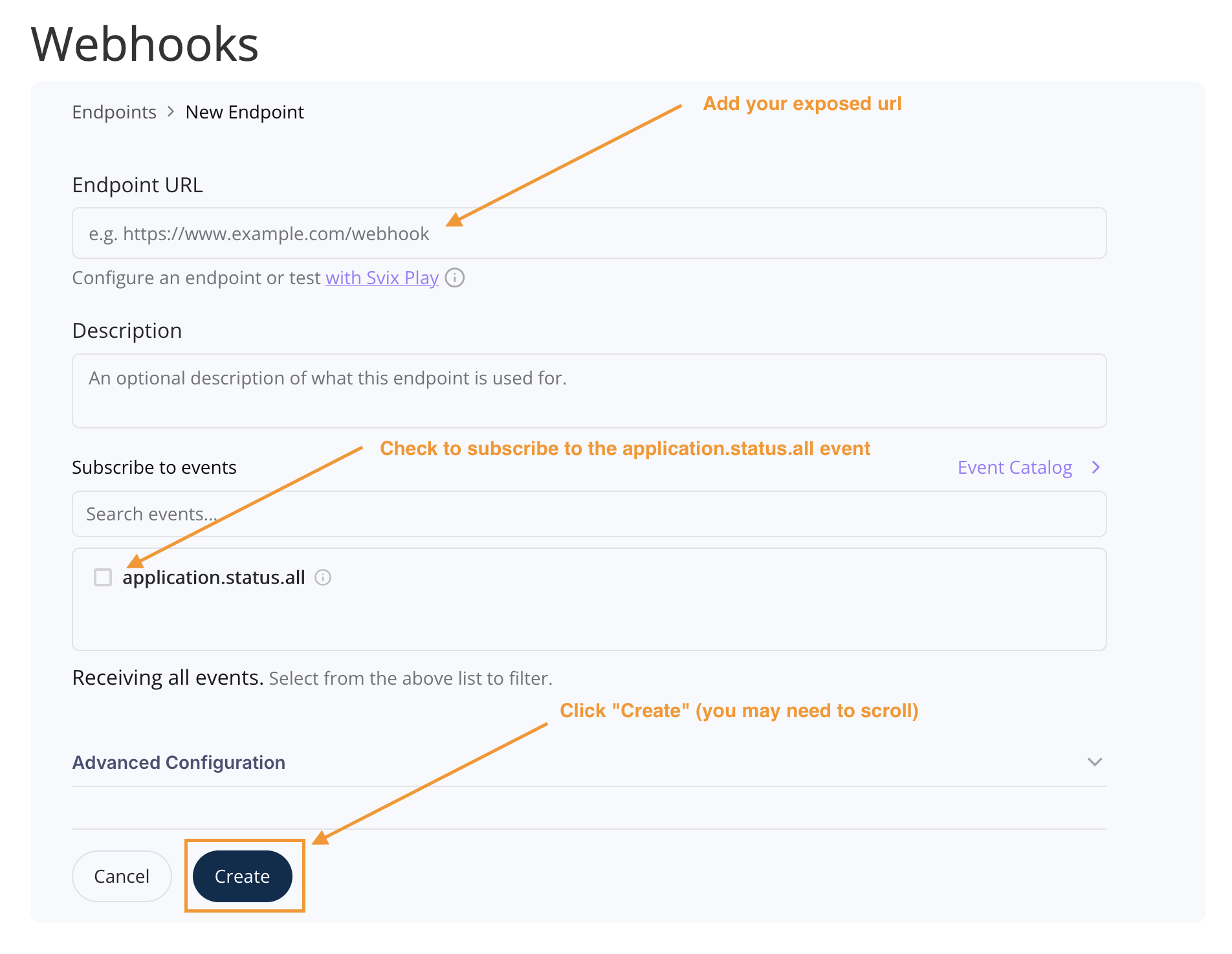
Open Administration > Webhook in the Merchant Portal, select Add Endpoint and enter the public HTTPS URL that should receive events. It must accept
POST requests with a JSON body.You can subscribe to
application.status.all to be updated on every status change.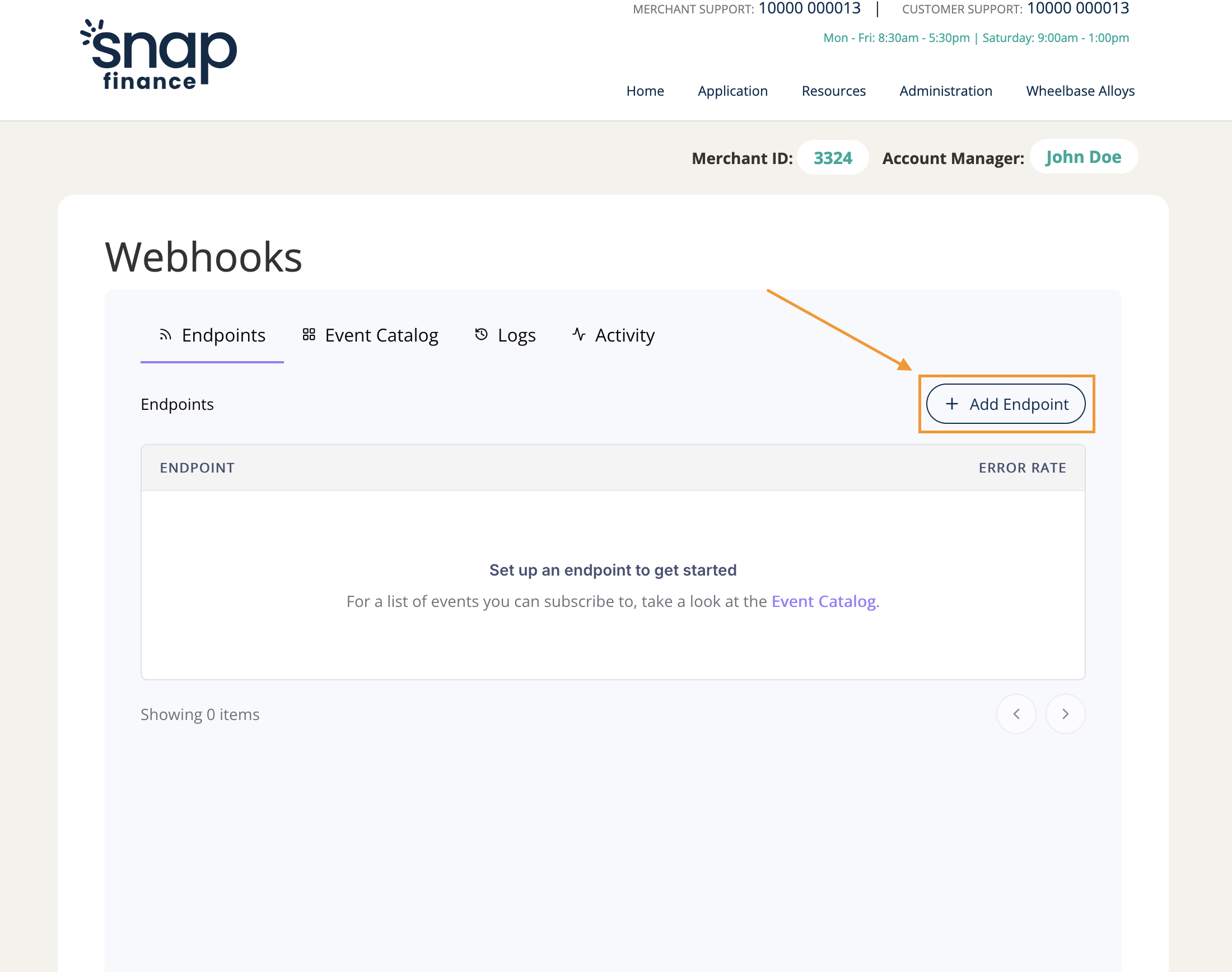
Step 03 Verify signatures
Every request is signed so you can check it came from Snap. Copy the signing secret for your endpoint from the Webhooks portal and keep it on your server.
Request carries these headers:
| Header | Use |
|---|---|
webhook-id | A unique ID for the message. The same ID is used if a delivery is retried. |
webhook-timestamp | When the message was sent. Used when checking the signature. |
webhook-signature | The signature of the message. Use it to confirm the message came from Snap Finance. |
Verify them with the open-source
svix library, available for Node.js, PHP, Python, Java, .NET and more. Verify against the raw request body, before parsing the JSON. Reject any request that fails verification.// Node.js + Express
import express from 'express';
import { Webhook } from 'svix';
const app = express();
const webhook = new Webhook(process.env.SNAP_WEBHOOK_SECRET);
app.post(
'/webhooks/snap',
express.raw({ type: 'application/json' }),
(req, res) => {
let event;
try {
// Throws if the signature or timestamp is invalid
event = webhook.verify(req.body, req.headers);
} catch (error) {
return res.sendStatus(400);
}
// Respond first, then process the event in the background
res.sendStatus(204);
handleSnapEvent(event);
},
);Step 04 Respond quickly
Return a
2xx status as soon as you have verified and stored the request, and do any slower work (such as updating your order system) afterwards. Anything else is treated as a failed delivery.If your endpoint is unavailable or returns an error, the delivery is retried automatically. You can also see failed deliveries in the Webhooks portal and resend them once the issue is fixed.
Reference
Events
Every event we send, and the fields each one includes.
Payload
Every event shares the same top-level fields. Types use JSON terms. “string (date-time)” means a string such as
2026-08-04T07:47:30+01:00. Amounts are in pounds.| Field | Type | Description |
|---|---|---|
applicationId | number | Snap Finance’s numeric ID for the application. |
snapAppId | string | The application reference, for example 2608040647UK. It is shown to customers and in the Merchant Portal. |
status | string | The new status. See Status. |
previousStatus | string or null | The last status before this change. null on PENDING, the first status. |
timestamp | string (date-time) | When the change happened, in UK time with an offset, for example 2026-08-04T07:47:30+01:00. |
continueLink | string or null | Reserved. Currently always null. |
data | object | The status-specific fields. See Fields in data. |
Every key is always present. A key that does not apply to the status is
null, both at the top level and in data.Status
The
status field in the body, sent on every event, holds the current status of the application in capitals, for example APPROVED_WITH_CONDITIONS.| Status | Sent when |
|---|---|
PENDING | The application has been created. |
APPROVED | The customer has been approved. |
APPROVED_WITH_CONDITIONS | The customer has been approved, subject to the checks listed in verificationRequired. |
DENIED | The application has been declined. |
PENDING_DOCS | Snap Finance is waiting for documents from the customer. |
PENDING_DEL | The agreement is in place and is waiting for delivery. |
COMPLETE | Delivery has been confirmed and the application is complete. |
WITHDRAWN | The application has been withdrawn. |
FUNDED | The agreement has been funded. |
Payloads by status
Choose a status to see an example payload. Values are illustrative. Each example shows every key, with
null where a key does not apply to that status. Switch on Hide null fields to see only the keys that hold a value.pending.json
{
  "applicationId": 1234567,
  "snapAppId": "2608040647UK",
  "status": "PENDING",
  "timestamp": "2026-08-04T07:45:12+01:00",
  "data": {
    "createdAt": "2026-08-04T07:45:10+01:00"
  }
}Fields in data
Every key below is always present in
data. It holds a value on the statuses shown and is null otherwise.| Field | Type | Description | Has a value on |
|---|---|---|---|
createdAt | string or null | When the application was created. | PENDING |
approvedAt | string or null | When the application was approved. | APPROVED, APPROVED_WITH_CONDITIONS |
maxAmount | number or null | The maximum amount the customer is approved for, in pounds. | APPROVED |
maxTerm | number or null | The maximum term in months. | APPROVED |
expiryDate | string or null | When the approval expires. | APPROVED |
offers | array of offers, or null | The offers available to the customer. See Offer fields.* | APPROVED |
verificationRequired | array of strings, or null | The checks the customer still needs to complete, for example ["ACCOUNT_SCORE"]. | APPROVED_WITH_CONDITIONS |
verificationExpiry | string or null | When the verification step expires. | APPROVED_WITH_CONDITIONS |
declinedAt | string or null | When the application was declined. | DENIED |
declineReason | string or null | The decline reason code, for example OVERDRAFTS. | DENIED |
documentsExpiry | string or null | When the customer’s documents are due by. | PENDING_DOCS |
termMonths … totalCashPrice | as in Offer fields | The agreed figures for the application. They use the same fields, types and meanings as the offer fields, but sit directly in data.* | PENDING_DEL |
fulfilmentExpiry | string or null | The date by which the order needs to be fulfilled.* | PENDING_DEL |
completedAt | string or null | When the application was completed. | COMPLETE |
withdrawnBy | string or null | Who withdrew the application, for example SNAP. | WITHDRAWN |
withdrawnAt | string or null | When the application was withdrawn. | WITHDRAWN |
withdrawReason | string or null | The reason for the withdrawal, for example Expired. | WITHDRAWN |
fundedAmount | number or null | The amount funded, in pounds. | FUNDED |
fundingDate | string or null | The date of funding. | FUNDED |
fundingReference | string or null | The funding reference. | FUNDED |
* Offer details are included for some account types, and are
null otherwise. Your account manager can confirm what your store receives.Offer fields
Each item in
offers has these fields.| Field | Type | Description |
|---|---|---|
termMonths | number | Term of the agreement in months. |
apr | number | Annual percentage rate, for example 29.8. |
interestRate | number | Interest rate, for example 0.35. |
approvedAmount | number | Approved amount in pounds. |
loanAmount | number | Loan amount in pounds. |
repaymentAmount | number | Amount of each repayment in pounds. |
paymentFrequency | string | How often repayments are made, for example MONTHLY or WEEKLY. |
totalRepayable | number | Total amount repayable in pounds. |
totalInterestRepayable | number | Total interest repayable in pounds. |
deposit | number | Deposit in pounds. |
totalCashPrice | number | Total cash price in pounds. |
Reserved fields
These keys are present in
data for consistency and are currently always null: subsidyPercentage, subsidyFee, brokerCommission, brokerCommissionAmount, errorCode, errorMessage, occurredAt.Guide
Best practices
Make your integration reliable in production.
Handle duplicates and ordering
A message can be delivered more than once, for example after a retry. Make your handler safe to run twice, using
applicationId, status and timestamp to spot a message you have already processed.Messages for the same application can also arrive out of order. Compare
timestamp values to find the latest before you overwrite a newer status.Use status and previousStatus
status tells you what the message is about. previousStatus tells you where the application was before.Expect nulls and new keys
Every key is always present, and a key that does not apply to the status is
null. Check for null before you read a value.We may add new keys over time. Your code should not fail when it sees one it doesn’t know.
Confirm before fulfilling high-value orders
Webhooks tell you that something changed. For high-value orders, you can also call the Status API from your server to confirm the latest status before you ship.
Test in the sandbox
Point an endpoint at your test environment and run sandbox applications to see each event arrive. The sandbox testing guide explains how to force each outcome.